Kostenlos · ohne Anmeldung · Deutsch und Englisch · Hell und Dunkel
Free of charge · no sign-up · German and English · light and dark
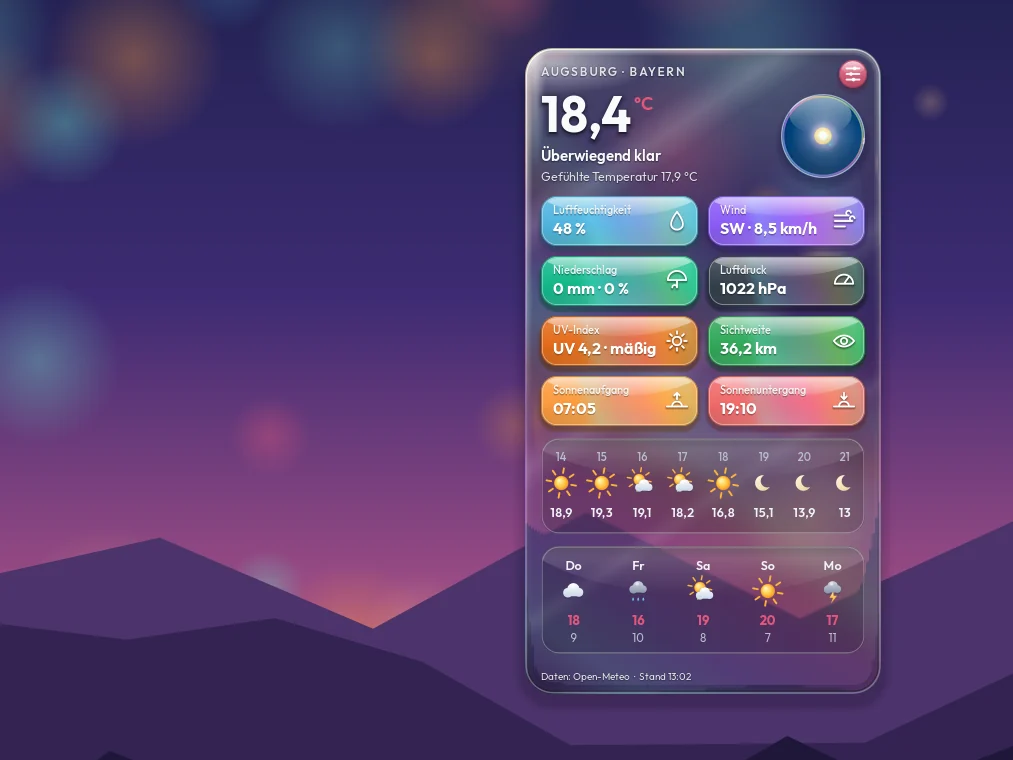
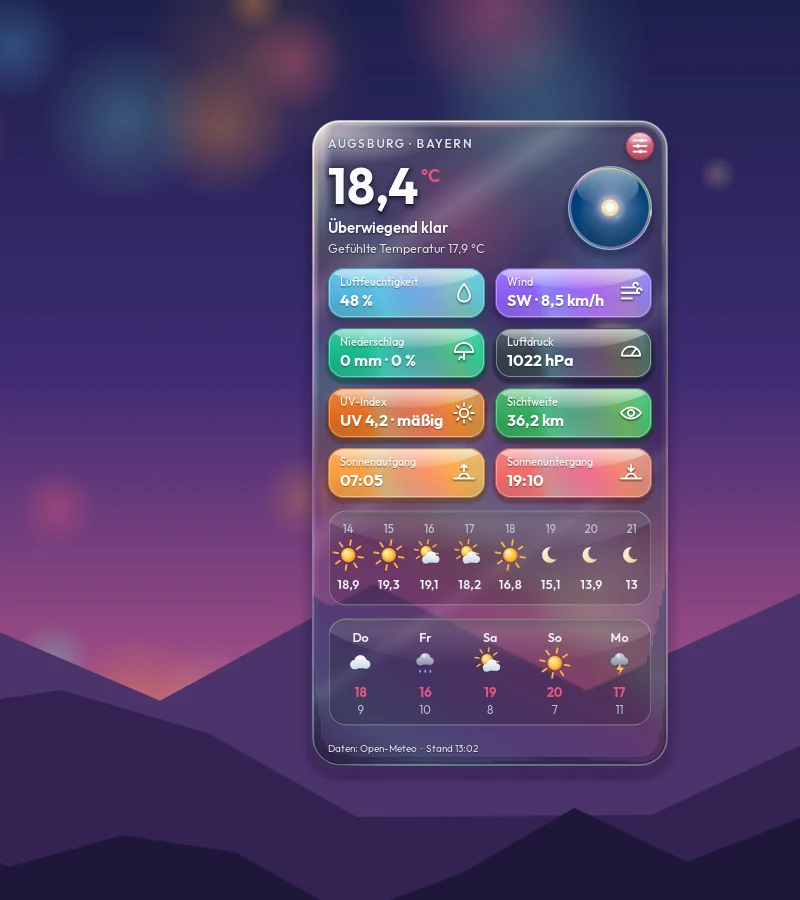
Gezeichnet von Rikus Weather selbst — mit Beispielwerten für Augsburg.
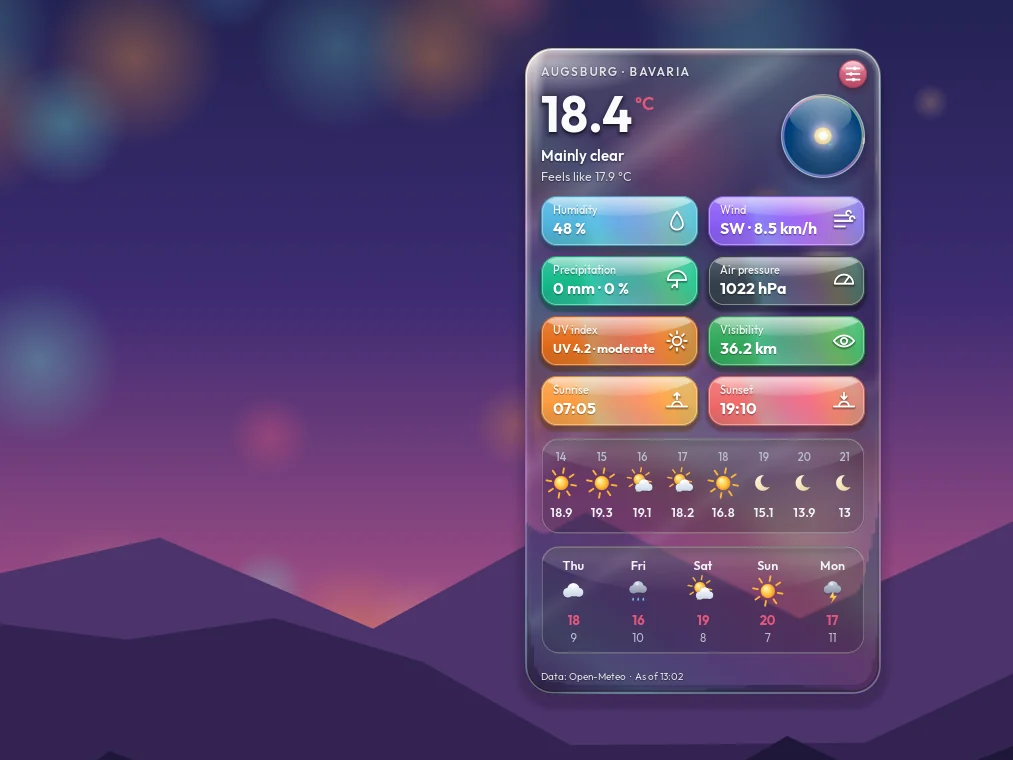
Drawn by Rikus Weather itself — with sample values for Augsburg.
Worum geht es? — in einfachen Worten
What is this about? — in plain words
Stell dir einen Blick aus dem Fenster vor — nur dass das Fenster auf deinem Bildschirm hängt. Rikus Weather zeigt das Wetter direkt auf dem Hintergrundbild: hinter allen Fenstern, ohne Knopf in der Leiste, auf jeder Arbeitsfläche.
Picture a look out of the window — only the window hangs on your screen. Rikus Weather shows the weather right on your wallpaper: behind all windows, without a button in the panel, on every workspace.
Du suchst deinen Ort, und die Karte zeigt, wie warm es ist, wie es sich anfühlt, Wind, Regen, Sonne und die nächsten Tage. Mit einem Rechtsklick stellst du alles ein — was zu sehen ist, wo die Karte steht, wie groß sie ist und wie sie aussieht: von schimmernder Keramik bis Liquid Glass, durch das dein Hintergrundbild scheint.
You look up your place, and the card shows how warm it is, how it feels, wind, rain, sun and the coming days. A right-click lets you set everything up — what is shown, where the card sits, how big it is and how it looks: from shimmering ceramic to liquid glass with your wallpaper shining through.
So sieht sie aus — probier jeden Knopf
This is how it looks — try every button
Links die Karte auf einem Hintergrundbild, rechts dieselben Knöpfe wie im Programm. Jedes Bild hat Rikus Weather selbst gezeichnet.
On the left the card on a wallpaper, on the right the same buttons as in the program. Rikus Weather drew every picture itself.
Rikus Weather
KachelnTiles
GlasGlass
Durchsichtigkeit der KarteCard transparency
KeramikCeramicMitteMiddleGlasGlass
Mit flüssigem Glas: Regler links Keramik, rechts Glas.With liquid glass: slider left ceramic, right glass.
Im Programm gibt es noch mehr: Ort, Farbe, Einheiten, neun Plätze auf dem Bildschirm, Größe, jeden Wert einzeln an und aus — und die Karte lässt sich mit der Maus an jede Stelle ziehen.
The program has even more: place, colour, units, nine spots on the screen, size, every value on or off — and you can drag the card anywhere with the mouse.
Das kann es — auf einen Blick
What it can do — at a glance
Dein Ort
Your place
Stadt oder Dorf eintippen, aus der Liste wählen — fertig. Die Karte zeigt den Namen oben, damit du immer weißt, wofür sie gilt.
Type a town or village, pick it from the list — done. The card shows the name at the top, so you always know what it is for.
Alles Wichtige
All that matters
Temperatur und wie es sich anfühlt, Luftfeuchtigkeit, Wind, Niederschlag, Luftdruck, UV-Index, Sichtweite, Sonnenaufgang und -untergang — jeden Wert einzeln an oder aus.
Temperature and how it feels, humidity, wind, precipitation, air pressure, UV index, visibility, sunrise and sunset — switch every value on or off.
Stunden und Tage
Hours and days
Die nächsten acht Stunden mit Bild und Temperatur, dazu fünf Tage mit höchster und tiefster Temperatur.
The next eight hours with a picture and the temperature, plus five days with the highest and lowest temperature.
Keramik bis Liquid Glass
Ceramic to liquid glass
Ein Regler führt die Karte von schimmernder Keramik bis zu flüssigem Glas, durch das dein Hintergrundbild scheint — als Klarglas, Hologramm oder Milchglas.
One slider takes the card from shimmering ceramic to liquid glass with your wallpaper shining through — as clear glass, hologram or frosted glass.
Kacheln, Farben, Hell und Dunkel
Tiles, colours, light and dark
Drei Kachel-Arten — Glasur, Schwebend, Seifenblase —, vier Farben oder eine eigene, Hell oder Dunkel. Dunkel ist Anthrazit, nie Schwarz.
Three kinds of tiles — glaze, floating, soap bubble —, four colours or one of your own, light or dark. Dark is anthracite, never black.
Dein Platz, deine Größe
Your spot, your size
Eine von neun festen Stellen wählen oder die Karte mit der Maus hinziehen, wo du willst. Größe von 70 bis 140 Prozent.
Pick one of nine fixed spots or drag the card with the mouse wherever you like. Size from 70 to 140 percent.
Deutsch und Englisch
German and English
Die Sprache folgt deinem Rechner: Ist er deutsch eingestellt, spricht die Karte Deutsch, sonst Englisch.
The language follows your computer: set to German, the card speaks German, otherwise English.
Hält sich selbst frisch
Keeps itself fresh
Holt das Wetter alle 15, 30, 60 oder 120 Minuten neu — du wählst. Grad Celsius oder Fahrenheit, Wind in km/h oder m/s.
Fetches the weather again every 15, 30, 60 or 120 minutes — your choice. Degrees Celsius or Fahrenheit, wind in km/h or m/s.
Ohne Konto, startet von selbst
No account, starts by itself
Die Wetterdaten kommen von Open-Meteo, ganz ohne Anmeldung. Nach dem Anmelden am Rechner ist die Karte einfach da.
The weather data comes from Open-Meteo, with no sign-up at all. After you log in to your computer, the card is simply there.
Die eigene Paketquelle
Our own package source
Einmal eintragen — und jede neue Fassung kommt von selbst.
Set it up once — every new version then arrives on its own.
Statt die Datei für jede neue Fassung wieder von Hand zu holen, geht es auch anders: Rikus Weather liegt in einer eigenen Paketquelle. Das ist dieselbe Technik, mit der dein System auch alle anderen Programme aktuell hält. Du trägst sie einmal ein — danach erscheint jede neue Fassung ganz normal bei deinen Systemaktualisierungen, ohne dass du etwas tun musst.
Instead of fetching the file by hand again for every new version, there is another way: Rikus Weather is available from our own package source. It is the same technique your system uses to keep all other programs current. You add it once — after that every new version simply shows up with your normal system updates, with nothing left for you to do.
Vorher kurz prüfen: Welchen Desktop hast du? Für Xfce und Cinnamon heißt das Paket rikus-weather, für GNOME rikus-weather-gnome — mehr dazu weiter unten unter „Was du brauchst“.
Check first: which desktop do you have? For Xfce and Cinnamon the package is called rikus-weather, for GNOME rikus-weather-gnome — more about that further down under “What you need”.
Schritt 1 — den Schlüssel holen. Damit erkennt dein Rechner, dass die Pakete wirklich von uns kommen und unterwegs niemand etwas verändert hat. Auf frisch installierten Rechnern fehlt oft das kleine Programm curl – der Befehl holt es gleich mit:
Step 1 — get the key. With it your computer can tell that the packages really come from us and that nobody changed anything on the way. Freshly installed computers often lack the small program curl – the command installs it first:
Danach mit Xfce oder Cinnamon im Startmenü einmal auf „Rikus Weather“ klicken — ab dem nächsten Anmelden kommt die Karte von selbst. Mit GNOME einmal ab- und wieder anmelden — dann steht sie auf dem Desktop. Einen Code braucht sie nicht. Hast du die Quelle schon für ein anderes Rikus-Programm eingetragen, genügt Schritt 3.
Then, on Xfce or Cinnamon, click “Rikus Weather” once in the start menu — from your next login on the card comes up by itself. On GNOME, log out and back in once — then it is on your desktop. It needs no code. If you already added the source for another Rikus program, step 3 is all you need.
Du willst die Quelle wieder loswerden? Ein Befehl, und alles ist wie vorher — die Wetterkarte selbst bleibt installiert:
Want to remove the source again? One command and everything is as before — the weather card itself stays installed:
Es bricht mit einer Meldung über Abhängigkeiten ab? Das passiert auf Debian 13 und LMDE 7, wenn dort das Zusatzlager backports eingeschaltet ist und schon Pakete daraus benutzt werden, zum Beispiel für Hyprland. Dann passen zwei Bausteine nicht zusammen. Das betrifft nur die GNOME-Fassung. So klappt es:
It stops with “unmet dependencies”? This happens on Debian 13 and LMDE 7 when the backports repository is switched on and packages from it are already in use, for example for Hyprland. Then two building blocks do not fit together. This only affects the GNOME version. This works:
Den Xfce- oder den Cinnamon-Desktop — zum Beispiel Linux Mint 22.3 mit Xfce oder Cinnamon, oder Debian 13 mit Xfce. Dafür ist das Paket rikus-weather. Auf anderen Oberflächen wie KDE ist es noch nicht erprobt; der Eintrag im Startmenü erscheint dort deshalb nicht.
The Xfce or the Cinnamon desktop — for example Linux Mint 22.3 with Xfce or Cinnamon, or Debian 13 with Xfce. That is what the package rikus-weather is for. On other desktops such as KDE it has not been tried out yet, so its start-menu entry does not appear there.
Damit das Glas durchsichtig sein kann, muss in Xfce das Compositing eingeschaltet sein — so ist es von Haus aus; Cinnamon hat es immer an. Ist es aus, zeigt die Karte einfach einen deckenden Hintergrund.
For the glass to be see-through, compositing has to be switched on in Xfce — it is out of the box; Cinnamon always has it on. If it is off, the card simply shows a solid background.
… oder den GNOME-Desktop, und zwar GNOME 48 — zum Beispiel Debian 13 mit GNOME. Dafür gibt es das eigene Paket rikus-weather-gnome: Nach dem Installieren einmal ab- und wieder anmelden, dann steht die Karte auf dem Desktop. Ein- und ausschalten lässt sie sich dort bei den Erweiterungen.
… or the GNOME desktop, namely GNOME 48 — for example Debian 13 with GNOME. There is a separate package for it, rikus-weather-gnome: after installing, log out and back in once, and the card is on your desktop. You switch it on and off there under Extensions.
Andere GNOME-Fassungen sind noch nicht erprobt; dort lässt sich das Paket nicht installieren. Und bitte nur auf einem GNOME-Desktop installieren — auf einem anderen Desktop würde es die ganze GNOME-Oberfläche mitbringen.
Other GNOME versions have not been tried out yet; the package cannot be installed there. And please install it only on a GNOME desktop — on any other desktop it would bring along the whole GNOME environment.
Und eine Internetverbindung — die Karte holt das Wetter bei Open-Meteo. Ohne Verbindung zeigt sie den letzten Stand.
And an internet connection — the card fetches the weather from Open-Meteo. Without a connection it shows the last reading.
So bekommst du es
How you get it
Ohne Anmeldung und ohne Code — die Wetterkarte gehört dir sofort.
No sign-up and no code — the weather card is yours at once.
1
Datei holen
Get the file
Ein Klick auf den Knopf für deinen Desktop — Xfce und Cinnamon oder GNOME. Die Datei landet in deinem Download-Ordner.
One click on the button for your desktop — Xfce and Cinnamon, or GNOME. The file lands in your downloads folder.
2
Installieren
Install
Die Datei doppelt anklicken und installieren. Das Passwort ist dein normales Anmelde-Passwort.
Double-click the file and install it. The password is your normal login password.
3
Starten
Start
Xfce und Cinnamon: im Startmenü „Rikus Weather“ anklicken — ab dem nächsten Anmelden startet sie von selbst. GNOME: einmal ab- und wieder anmelden — dann ist sie da. Mit einem Rechtsklick auf die Karte suchst du deinen Ort.
Xfce and Cinnamon: click “Rikus Weather” in the start menu — from your next login on it starts by itself. GNOME: log out and back in once — then it is there. A right-click on the card lets you look up your place.
Dieses Programm kostet nichts und wird auch nie etwas kosten. Ich baue es in meiner Freizeit. Wenn es dir Arbeit erspart hat und du magst, freue ich mich über einen Kaffee — und wenn nicht, ist das genauso in Ordnung.This program is free and always will be. I build it in my spare time. If it saved you some work and you feel like it, I would be glad about a coffee — and if not, that is just as fine.